1. Begin with the decisions tracking must support
Before making changes to software, templates, or schedules, schools need clarity on the difference between two closely related processes. Robust tracking aligns directly with Scotland's National Improvement Framework (NIF) priorities: driving equity, closing the attainment gap, and supporting health and wellbeing.
Tracking
The routine recording of pupil progress, engagement, effort, and relevant performance indicators over time.
Monitoring
The ongoing review of recorded information to spot concerns, understand context, agree targeted actions, and evaluate impact.
A well-designed tracking system should provide staff with immediate, reliable answers to key professional questions:
In practice, platforms like pupil tracking software for Scottish secondary schools fulfil this by allowing leaders to seamlessly navigate from high-level whole-school overview cards right down to individual department drill-downs, class grids, and complete pupil profiles.
2. Use different approaches for BGE and Senior Phase
Avoid treating the whole school as though one tracking scale suits every course. Broad General Education (BGE) and Senior Phase serve different educational purposes and require distinct tracking metrics.
Broad General Education (S1–S3)
Focuses on progress towards Curriculum for Excellence (CfE) benchmarks (Third and Fourth Level milestones):
- Progress within or towards CfE levels
- Whether pupils are on track for expected S3 milestones
- Participation
- Effort
- Behaviour for learning
- Completion of classwork or deadlines
- Relevant teacher comments
Senior Phase (S4–S6)
Focuses on SQA qualifications (National 4, National 5, Higher, Advanced Higher):
- Course status
- Working grade where sufficient evidence exists
- Assessment completion
- Outstanding practical or assignment work
- Risk of non-completion
- Progress in vocational qualifications
Vocational Courses & Modular Qualifications
A working grade does not always make sense for SQA NPA, NC, Skills for Work or other modular courses. Smart School Tracking allows schools to use pass/fail, module progress, course status or other custom indicators for these subjects rather than forcing every course into a fixed letter-grade structure.
3. Stop collecting fields that nobody uses
Data collection fatigue occurs when teachers are forced to fill in fields that never lead to an action. For every tracking field, schools should ask:
The 5 Metric Evaluation Questions
- What decision will this support?
- Who needs it?
- Is it relevant to every subject?
- Will it lead to an action?
- Is the information already held elsewhere?
For example, if certain faculties—such as Physical Education, Art, Practical Craft Skills, or Drama—do not set traditional written homework, why force teachers to complete a generic "Homework" field? Adapting tracking fields to match departmental realities prevents tokenistic data entry and ensures every collected metric serves a genuine purpose.
Weak Approach
Every subject completes the exact same fixed fields, forcing practical non-exam subjects to grade irrelevant categories like written homework.
Better Approach
The school agrees a small core dataset, then adapts fields to suit the specific needs of each department and what fits best for each course.
This is one of Smart School's clearest strengths. Schools can create custom fields such as Effort, Behaviour, Homework, Deadlines, On Track and Course Status, with their own scales and colour coding.
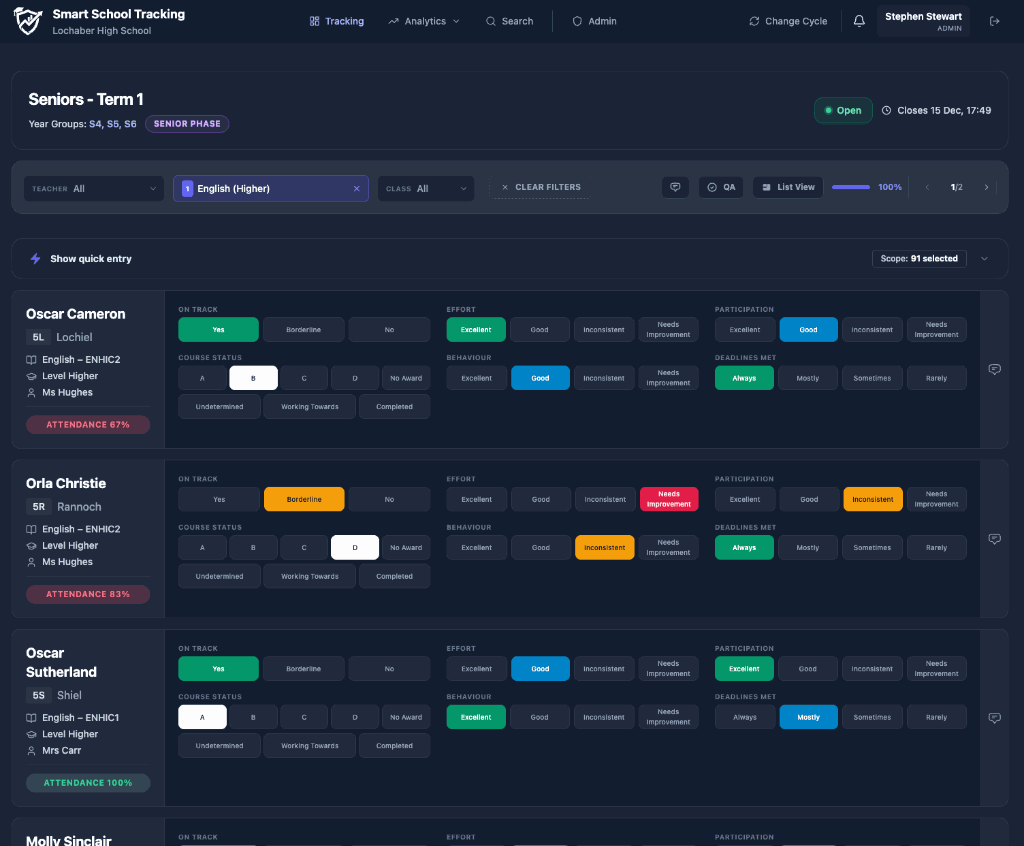
4. Make class entry fast enough that staff engage with it
Tracking quality will suffer if staff experience the process as a major administrative task.
Set class tracking completion deadlines 48 hours before the main tracking cycle window closes. This gives Principal Teachers and Faculty Heads dedicated time to run QA checks before data is used in attainment meetings or parent reports.
"The aim is not to enter data as quickly as possible. It is to remove unnecessary administration so teachers can spend their time making accurate professional judgements."
Key recommendations for data entry:
5. Create clear and shared metric definitions
Customisation is only useful when staff understand the categories consistently. For example, if a school uses On Track, it should clearly define:
- what evidence staff should consider;
- whether the judgement relates to the current course or expected destination;
- how missing assessment evidence should be handled;
- when a concern should be flagged;
- whether the definition changes between BGE and Senior Phase.
| Status | Suggested Meaning |
|---|---|
| On track | Current evidence suggests expected progress. |
| Some concern | Progress is inconsistent or evidence is incomplete. |
| Significant concern | Current evidence indicates substantial risk without intervention. |
| Insufficient evidence | Not enough reliable evidence to make a secure judgement. |
Smart School provides default metrics out of the box, but schools can customise them completely.
View standard metric definitions Google Doc
6. Use tracking cycles to show change over time
One return is only a snapshot. Schools should be able to compare:
- current and previous course status;
- changes in effort or engagement;
- emerging concerns across subjects;
- whether interventions correspond with improvement;
- patterns affecting particular departments or groups.
"A concern becomes more meaningful when leaders can see whether it is new, persistent or improving."
Smart School stores previous tracking information and supports pupil profiles, attainment history and comparisons between tracking cycles.
7. Identify pupils with concerns across several subjects
A single concern in one subject may need a departmental response. Several concerns across the curriculum may indicate a wider pastoral or learning issue.
Effective monitoring identifies:
- pupils flagged by multiple departments simultaneously;
- recurring deadline or participation concerns;
- sudden deterioration between tracking cycles;
- combinations of attainment and engagement concerns;
- pupils whose current picture differs significantly from previous performance.
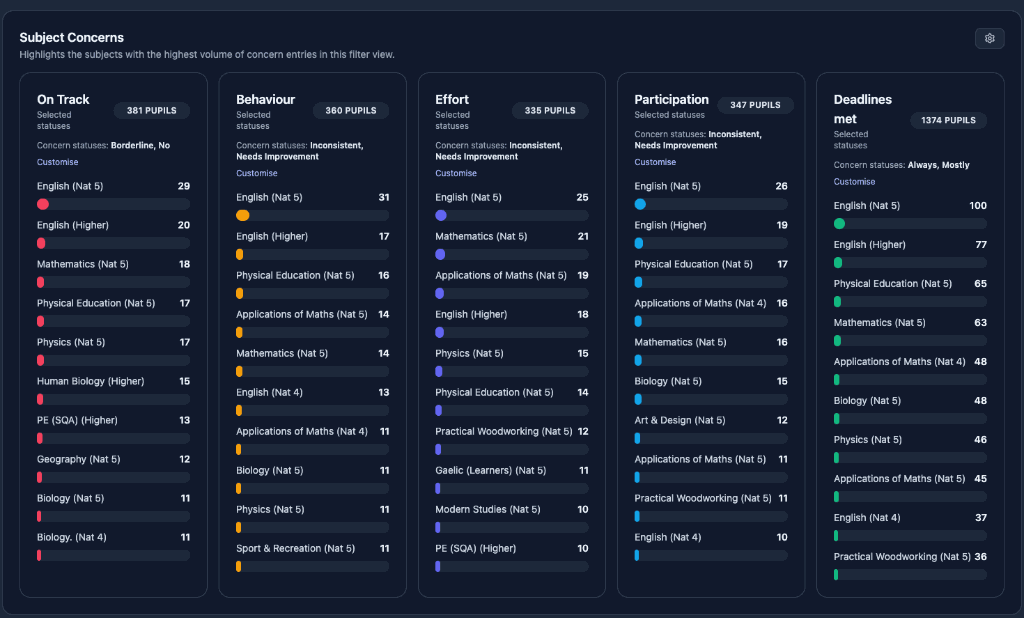
Smart School includes intervention watchlists and dedicated guidance views so pastoral staff can review all metrics across their caseload rather than opening each subject individually.
8. Use analytics to ask better questions
Dashboards and analytics are not an end in themselves; their true value lies in prompting deeper professional dialogue across leadership teams.
"Analytics should help leaders decide where to investigate. They should not replace professional dialogue or automatically judge a teacher, class or department."
Key analytics views include:
Smart School provides these whole-school and departmental drill-downs, alongside key Senior Phase measures and QA information on the central school analytics dashboard.
9. Improve attainment meetings
A useful attainment meeting should not consist of reading percentages from a spreadsheet. To be productive, meetings must focus on context, evidence, and agreed action.
Use a consistent meeting structure:
Progress Shift
What has changed since the previous tracking cycle?
Cohort Analysis
Which pupils or focus groups explain the change?
Pattern Scope
Is the pattern school-wide, departmental or class-specific?
Evidence Base
What evidence supports the current professional judgement?
Current Actions
What intervention is already taking place?
New Requirements
What targeted action is now required?
Action Ownership
Who explicitly owns the action plan?
Impact Review
When will impact be formally reviewed at the next cycle?
Smart School’s dashboard, department drill-downs, pupil profiles, key measures and exports can be used to prepare and support these meetings. Read our detailed guide on using a school data dashboard in attainment meetings.
10. Track interventions properly
Do not simply flag a pupil and assume the problem is being addressed. An intervention record should include:
Smart School’s watchlists and pupil-history features can help staff identify concerns and revisit them during later cycles. The platform acts as a lightweight tracking and review tool rather than a full safeguarding case-management system.
11. Build QA into the process
Before data is used for reports or strategic decisions, leaders need to know whether the tracking cycle is complete. QA should identify:
Use automated completion dashboards to spot departments awaiting sign-off instantly. This avoids sending site-wide email reminders to staff who have already submitted their returns on time.
Smart School provides dedicated department QA and completion oversight, particularly when preparing parent reports. This is a strong differentiator because QA is often handled through separate spreadsheets and email reminders.
12. Connect tracking and parent reporting
Schools should not ask staff to enter the same information twice. A better process is:
Smart School uses tracking-cycle information to create 10 branded parent-report templates, supports email or print distribution, allows selected groups or individuals to be sent reports and supports multiple parent or carer email addresses.
Learn more on our dedicated school reporting software page.
13. Keep SEEMiS as the source of core pupil and class information
A pupil tracking system does not need to replace SEEMiS. Instead, it works alongside SEEMiS Click+Go by importing core pupil, class, subject and course information via standard spreadsheet uploads.
By keeping SEEMiS as the master record, schools can:
- export pupil details, class lists, and course structures directly from Click+Go;
- upload data into the tracking platform in seconds;
- keep staff focused on progress tracking, attainment analytics, and parent reporting.
In Smart School Tracking, this workflow is as simple as generating an Excel report in SEEMiS Click+Go and dragging it directly into the platform. Read more on our SEEMiS-compatible tracking software page.
14. Make the system usable for different staff roles
Tracking is not solely an administrative tool for Senior Leadership; it must deliver immediate value to every tier of school staff:
Teachers
- rapid class entry;
- relevant metrics;
- clear definitions;
- previous information where useful.
Principal Teachers & Faculty Heads
- completion oversight;
- class comparisons;
- quality assurance;
- department trends.
Guidance & Pastoral Staff
- caseload view;
- multi-subject concerns;
- pupil history;
- intervention flags;
- exports for meetings.
Senior Leaders
- whole-school measures;
- stage and department analysis;
- target groups;
- tracking-cycle comparisons;
- reporting oversight.
Smart School is explicitly designed to provide different levels of visibility for classroom teachers, middle leaders, guidance staff and senior leaders.
15. Review the workload and impact each year
School leaders should evaluate tracking processes annually against How good is our school? (4th edition) (HGIOS?4) Quality Indicators (specifically QI 2.3: Learning, Teaching & Assessment and QI 3.2: Raising Attainment & Achievement) using a self-evaluation checklist:
Review your compliance and data governance on our GDPR and DPIA information page.
16. What this can look like in practice
A Scottish secondary school completes its first tracking cycle in November. Teachers record On Track status, Effort and a department-specific measure. Faculty Heads use the QA view to identify missing returns before the cycle closes. Senior leaders review whole-school and departmental trends, while guidance staff use the watchlist to identify pupils flagged across several subjects. Targeted actions are agreed and reviewed at the next cycle. The verified tracking data is then used to produce branded PDF reports for parents, avoiding a separate reporting return.
Smart School Tracking has been designed to support this workflow through custom metrics, fast data entry, QA, analytics, guidance views, tracking history and parent reporting.
17. Software Scope and Professional Boundaries
Effective tracking software provides clarity and workload reduction, but leadership teams must recognise its natural boundaries. Smart School Tracking is designed with clear professional restraint and does not claim to:
Frequently Asked Questions
Common questions from Scottish secondary school leadership teams about tracking, monitoring, and workload:
What is the difference between tracking and monitoring in Scottish secondary schools?
Tracking is the routine recording of pupil progress, engagement, effort, and performance indicators over time. Monitoring is the ongoing professional review of that recorded data to spot concerns, understand context, agree interventions, and evaluate impact.
How do Scottish secondary schools track non-exam SQA vocational courses (NPAs & NCs)?
Schools should base tracking indicators on the specification for each award. Depending on the qualification, this may include unit achievement, evidence completion, portfolio progress, practical assessment, resubmission requirements or overall award status.
How does pupil tracking software integrate with SEEMiS Click+Go?
Smart School Tracking allows schools to import pupil lists, class registers and course structures using standard Excel exports generated through SEEMiS Click+Go.
How does structured tracking support HGIOS 4 self-evaluation?
Structured tracking cycles can provide useful evidence for self-evaluation against Quality Indicator 2.3 and Quality Indicator 3.2, alongside classroom observation, professional dialogue, learner feedback and other evidence.
Want to see what this looks like in practice?
See how Smart School Tracking handles BGE and Senior Phase tracking, reporting and attainment analysis.